This is a new scam for me. I belong to an art group (club, collaborative, collective, etc) and I received an email that looks like it could have come from the director of the club. I have changed the identity of the club name and director for their privacy. This is the message I received:
Hello Ellen,
Are you available for assistance? I’m out of the state now, I have absolute confidence in you to handle this. The [Nameless Art Club] need electronic gift cards to make donations to Veterans in Hospice and Palliative care units to buy coronavirus disease (COVID-19) prevention items. I’m responsible for the reimbursement. Would you like further information?
Peggy Sue [Nameless Art Club Director]
At first glance, I thought this was legit because I was/am a member of the art club listed here and the chair’s name, Peggy Sue (not their real name for privacy), was signed at the bottom. Additionally, Peggy Sue was also listed as the name on the email.
Then I felt a little embarrassed that I didn’t understand the ask here and I fed the message into my AI chatbot. AI told me it was a scammer. That’s when I looked at the email and discovered it was not a message from Peggy (and not tied to Peggy’s usual email). It came from here: cj516137@gmail.com
I don’t know who’s email that was and that’s when I realized a scammer at the other end of that email used the Art Club member’s list to send messages like this one, with hopes that they’ll catch someone off guard.
Next steps:
Usually I ignore these and send them to spam. However since this scammer was using the name of someone I actually know and have met, and using the Art Club that I was personally a member of as a basis for their scam, I alerted Peggy (at her real email) right away so that she could warn everyone else in the Club.
I hope you find this helpful, and have a great week!
If you’re an artist who sells your work on the internet, people will try to steal it and sell it as if it was their own work. What I didn’t expect is that AI would be trained on my artwork, and then modified versions of my work would then be sold and passed off as someone else’s. I wouldn’t even have expected this to happen to me had I not made an unrelated social media post advising AI users to do an inverse image search so they’re not accidentally violating someone else’s intellectual property (IP) rights.
After making my post, I received pushback from people defending the “originality” of AI. Random people on the internet were *shocked* that AI could possibly be used as a tool to facilitate an intellectual property crime. I was pretty shocked that so many people don’t realize this. I just assumed everyone knows that AI is trained on other people’s artwork, and IP violations are a well-documented thing.
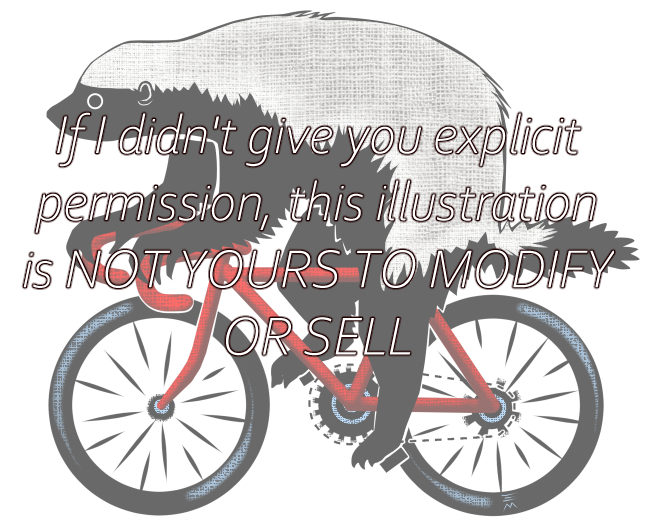
Then I remembered an instance of IP violation of my own work where a company decided to steal my work, modify it, and use it on all of their products. I will use a made-up name to refer to the infringing company as “Bogus Wonder” (I don’t want shame them by using their real name as I’m sure they didn’t knowingly violate my intellectual property rights). I initially thought Bogus Wonder got an armature artist to remove the head from my Honey Badger illustration and replace it with a cartoon head. But, upon closer inspection, I have reason to believe that Bogus Wonder decided to completely forgo hiring an artist and just use AI without doing an inverse image search.
The first image you see is my image. This is my “Honey Badger on a Bicycle” illustration. I have not given anyone permission to modify, use, or sell this image:
This second image below is the one I discovered Bogus Wonder using as their logo and on all of their merch and website:
How do I know this image was created using AI? Well, I can’t 100% say for sure. But I did notice the odd AI thing that you’ll commonly find. I pointed it out with the red arrow in the above image. Any self-respecting artist would know how to draw a ‘partial head turn’ of a cartoon character’s face. AI wouldn’t understand where to place the ear, so it would likely attach it to the face (as presented in the poorly drawn cartoon head modification of my work).
Seven days after I sent Bogus Wonder a cease-and-desist letter, they updated their merch labels and some images on their Facebook page. They still have yet to take down all of my images and pay me what they owe for using my image.
I created and began selling my Honey Badger illustration on my Zazzle site in 2018. Dall-E wasn’t released until 2021, and I didn’t start incorporating AI into my workflow until sometime 2024.
That means I hand-drew this Honey Badger on a Cintiq and put in a lot of time crafting all of the individual tufts and texture in her fur. I also spent a lot of time designing her delicate fingers and in getting the proportions of her body, arms legs and tail just right. If someone wants to turn a profit from my hard work, they would first need to reach out to get written permission to use my work.
In spite of all this, I do find AI to be a useful tool. However, it never gives me exactly what I want, and I usually end up spending a lot of time correcting and modifying what AI produces for me. I’m not too concerned yet that AI will replace actual artists (yet). Most of what it produces is amateurish or concepts that need modification and the professionalism of work and style is random.
After hours of frantically googling things like, “bleed rejected KDP graphic novel panels outside of margins”, I finally figured out the problem (with a little help from customer service). It took me a while to figure out what the problem was, what exactly to ask customer service, and so I continued to be rejected by the final KDP review process for days. In case anyone out there is having similar issues, I’m making this post for you.
It all started when I went to “edit paper content”, got everything set up and then hit “launch reviewer”. There were a number of errors telling me my content was outside the margin. This was annoying because I selected “bleed (PDF only)”, formatted my manuscript in Affinity with full bleed, and (I thought) should have passed the reviewer. I thought, well maybe if I flatten the whole document and rasterize all the text, the bots will accept it. It appeared to work, at first. With everything rasterized into a PDF, it passed the initial review stage. I was happy and excited for the moment. I ordered PROOF copies and waited just a few days for them to arrive. They arrived sooner than expected and looked absolutely beautiful (minus the cover watermark, but that’s a whole ‘nother blogpost). Then I selected the price and hit the “publish” button!
The next day, I got this message:
We checked your files and found issues you need to fix before your book can be published on KDP:
Add 0.125″ (3.2 mm) to your book’s page width and 0.25″ (6.4 mm) to the page height to ensure that the images in your manuscript extend beyond the edge of the page. Once you have added the size, extend any images or backgrounds that you want to reach all the way to the edge of the page 0.125” (3.2 mm) beyond the trim line. This prevents manufacturing issues when the file is trimmed to size. See examples PDF page(s) 62 – 64, 124. Watch our video, which explains trim size, margins, and bleed.
Increase your outside margins so that content isn’t trimmed when your book is printed. The outside, top, and bottom margin requirements are 0.25″ (6.35mm) for books without bleed and 0.375″ (9.52mm) for books with bleed. See examples on PDF page(s) 1 – 3, 61 – 63, 123 – 125. Watch our video, which explains trim size, margins, and bleedLearn how to calculate margins
This was a very confusing message and could have been worded more clearly for dyslexic people like me. Did they want me to add .125″ to the page size or the image size?
I decided to try it again by not rasterizing the text, but shifting it slightly so it stays within the margins like below. Note that this also included placing those ugly page numbers within my panels, so I made them really tiny and mostly inconspicuous:
You can see the word “mommeeeeee!” had to be pulled in a little so it would fit within the margins and this included any other word balloon that I placed just outside of the panels for a stylized effect. Not a huge deal, but I was a little sad I couldn’t just let my word balloons hang out like that and put my page numbers where I wanted them on the pages. It did pass the “launch reviewer” bots, so I went ahead and hit the “publish” button.
The next day I got another rejection letter. This time, however, I had fixed the “increase your margins” bullet point and was left with this one:
We checked your files and found issues you need to fix before your book can be published on KDP: Interior
Add 0.125″ (3.2 mm) to your book’s page width and 0.25″ (6.4 mm) to the page height to ensure that the images in your manuscript extend beyond the edge of the page. Once you have added the size, extend any images or backgrounds that you want to reach all the way to the edge of the page 0.125” (3.2 mm) beyond the trim line. This prevents manufacturing issues when the file is trimmed to size. See examples PDF page(s) 62 – 64, 123 – 124. Watch our video, which explains trim size, margins, and bleed.
This was the point where I started banging my head on my keyboard. I can only assume a bot looks at your work and it either passes or fails. The proof copy looked great, but the bots don’t care.
I bit the bullet and added .125″ to the page size and increased the entire book size from 9×6″ to 6.14″ x 9.21″. I thought this would surely increase the margins, but I felt defeated since this would raise the price of author copies by 3 dollars per book, and also significantly increase the customer price. I hit “publish” but continued to feel worse and worse about having to increase the size of my entire book.
Luckily, the larger scale book didn’t pass the review bots either, and I was determined to figure it out.
Unfortunately, I struggled to find resources for this specific problem in the KDP community forum. I began to suspect, however, that maybe it was just a bleed issue. I reached out to KDP customer service and was finally told by the marvelous ‘Sebastian’ from customer service: “The image must be either within the margins or extended to the edge”. Part of the issue was I was using rasterized jpegs with full panels. I wasn’t sure if it was the white space maybe triggering some kind of “bleed-bot” so I cropped all that whitespace out in Affinity, carefully double checked to be sure all of my panels were within my set margins, and pulled all the word-balloons into the margins as well. Tedious process, but doable. See below entire word balloons were pulled within the bounds of the margins.
Also, for some reason, my standard margins in my publishing software was slightly more narrow than the publishing margins in KDP – probably something I did wrong, but, oh well, it looks fine in review and gave me some opportunity to hang the balloons outside of the panels near the spine area. I think my next book, I’ll have them hanging on the outsides of the panels.
I hit publish and it worked! Yay! See below to purchase:
This is just the hardback – I’m actually waiting on a paperback PROOF to test out the difference between the “standard color interior” and “premium color interior”. Maybe I’ll check back soon with results – or probably just publish it and move on to my next book!
Just here to expose more job interview scams. Instead of creating a new post, I’ll be updating this post with new interview scams as I receive them with hopes that they’ll pop up in our ever-changing search engines, and hopefully help someone who just isn’t sure.
I am Claire Edison, Sr. Human Resources Coordinator at Abercrombie & Fitch Co. Your profile has been reviewed through coroflot.com. Abercrombie & Fitch Co. is seeking for a remote (full-time/freelance) illustrator to create high-quality artwork for our digital and print media publications. As an illustrator, you are required to work closely with our clients and marketing team to develop inspiring artwork that will attract our target audience.
I want to invite you to interview via Skype to learn more about the position and get to know you better. At Abercrombie & Fitch Co., we constantly seek to grow our teams with creative and talented people and achieve great things together.
Are you available? If so, I’d happily coordinate via Skype (live:.cid.b946c5acd269cf62) work Hours or Shift: Monday to Friday, 8:30 am – 5:30 pm. Salary: $120-150/Hr. Availability: Full-Time, Part-Time, Freelance.
I look forward to your reply.
Sincerely
Claire Edison. Sr. Human Resources Coordinator at Abercrombie & Fitch Co.
The grammar and spelling seemed okay, so I couldn’t go by that.
Next, I’ll look at where this email is delivered from. In this case, it’s “info@abercrombiefitchs.store” – also in the title attached to the email, now you’ll see an error. It spelled “fitchs”. If you go to the website, all of Abercrombie & fitch emails do not contain an “s” after the name, and note they are all (dot)coms. They don’t contain “(dot)store”. Also, they don’t seem to use “fitch” in their domain extension at all. Here’s the Abercrombie & Fitch official contact-us page: https://corporate.abercrombie.com/contact-us/ – note what the HR email actually looks like.
Then I looked at the sender’s name, and this person has two first names (a red flag for scams explained in my slightly embarrassing post about having a 2 hour interview with a scammer).
I also looked at where they found me – coroflot.com? I haven’t used that website in ages and only have one or two images up. I didn’t even list any of my experiences there. Actually, I forgot I had that account until now.
Best thing to do would be to mark as spam and ignore it.
Update 1/30/26
Received this email from “Marta Lajoso” at:
artist-care@singulartmailsecure.com
Header: “Collectors interested in your work
“Hi Ellen,
I’m Marta Lajoso from Singulart’s Artist Relations team, the leading online art gallery for collectors globally. Over the past few days, I noticed that a couple of collectors have been captivated by your artworks.
Are any of your artworks currently available for purchase?
Best regards, Marta Lajoso Artist Relations Manager, Singulart 25 Rue du Petit Musc, 75004 Paris, France”
Yes this is a scam, and sadly, “Marta Lajoso” may actually be a real person.
You’re poking around on Deviantart (for example) and you get an email from some rando named “mokalilat” and they say something like:
“Dear, [Your DeviantArt Username]! Your artwork received high praise from our team. Kаbаm Games invites you to a new project. Open positions:Junior/Middle/Senior 2D Artist;Junior/Middle/Senior 3D Artist;Senior/Middle Concept Artist;Art Director;Lead Artist;Senior/Middle UI Artist. I request you to examine the file containing examples of our company’s work. This will assist us in comprehending your capabilities and how they align with our company’s projects. Download: ragtedaburgay.gq/wpMLuIAAY Please note that the attached file is confidential and can only be opened on a computer. Reply here for to apply.”
At first you’re like, ‘heck yeah!’ But then you’re like, ‘wait a minute’, and you’re suddenly not sure about what to do or how to respond.
Here’s my recommendation – go straight to the company website: and check out their “careers” page. This is what you’ll find:
“Beware of phishing! We take your online safety seriously. We do not initiate contact with individuals for job offers or to solicit personal information through 3rd party sites. Please exercise caution and verify the authenticity of any unsolicited communication.”
https://kabam.com/careers/
Right there they state that they won’t contact you via a 3rd party messaging system (Deviant Art, Redbubble, Zazzle, etc.) And there is your answer – that message is safe to report as phishing/spam and without need to worry about missing some once-in-a-lifetime opportunity.
Below are some of the scammer “tells” as described in a previous (and moderately embarrassing blog post I did after wasting 2 hours of my life on a fake/phishing job interview):
Scammer has two first names.
Scammer can’t spell or use proper grammar (when message is written in English).
Scammer may use trusted sources like Indeed, Upwork, or Monster
Scammer wants you to send or receive money in unusual ways
Scammer has email from a general domain like “@gmail.com” or “@yahoo.com”
Don’t let your desire for success cloud your judgement in your path moving forward.
I’ve launched my marketing campaign for my latest book “The Yard Next Door” (working title), and I hit a small bump in the road and thought I’d blog about it. It took me about half a day to set up my Facebook business page (specifically for the book). I did a few things to initiate the process of making it look welcoming and to begin the engagement process:
cover art
profile picture
description
liked a bunch of pages that are relevant to my project (and also actually entertaining for me to follow, because if you don’t like what you follow, what’s the point, right?)
The next day I had a pleasant and unexpected surprise since I had not yet shared my page with anyone on my personal Facebook account. I had one organic follower (and then I told my husband, and he followed me too after doing a quick search for my book title). So, I have 2 followers and 50+ impressions, and I thought it would be great to see what my audience will eventually look like (and also, I might want to follow them back) – unfortunately, I discovered this information was unavailable. I can see the number of followers, but from the admin side it said, “You haven’t been followed by anyone yet”, and on the public view it said, “title” … “list of followers is unavailable.” See below for examples:
Admin view of the pagePublic view of the page
So, I’m thinking, ‘what the heck’ and I start Googling this issue like heck. All the suggestions out there were about changing the privacy settings, but it wasn’t very helpful – my privacy settings didn’t seem to be a problem here. The other suggestions included deleting the Facebook app and reinstalling it. I don’t use the app, so that didn’t help.
After additional searching, I found the “meta insights” area. It didn’t give me much info either except it left me with the impression that maybe, just maybe followers don’t show up until you get 100 of them (like with the “age and gender” section).
After a 3rd person followed my page, that’s when I realized that the two initial followers had their privacy settings turned on such that I wouldn’t be able to see who they are (except for my husband because I already know he’s ‘anonymously’ following me – nothing weird).
Anyway, I hope this is helpful for anyone having the same issue.
Between sketching on the playground with my toddler (more on that below code), I spend a fair bit of time staring at code. I’d probably spend a lot less time if I wasn’t such a noob, and it took me forever to figure out this Woocommerce problem I’d been having. If you’re trying to redirect your “add to cart” from a specific product category to a specific page, insert this bit of code into your “functions.php”, and you’ll be good to go (it at least worked for me). Take note of where you need to edit the code to suit your pages on your website. I hope this saves you some of that ‘noob’ time.
// redirects to same page
function my_custom_add_to_cart_redirect( $url ) {
if ( ! isset( $_REQUEST[‘add-to-cart’] ) || ! is_numeric( $_REQUEST[‘add-to-cart’] ) ) {
return $url;
}
$product_id = apply_filters( ‘woocommerce_add_to_cart_product_id’, absint( $_REQUEST[‘add-to-cart’] ) ); // Change ‘sandals’ category to your custom category and watch it redirect to your custom page ID below
if ( has_term( ‘sandals’, ‘product_cat’, $product_id) ) {
$url = get_permalink( 1 ); // 1 is the page ID to where you want everything to redirect after clicking “add to cart” button
}
return $url;
}
add_filter( ‘woocommerce_add_to_cart_redirect’, ‘my_custom_add_to_cart_redirect’ );
In other news, I often go to the playground with my toddler. Only half the time does she demand my attention to play with her. I use the other half of that time to stare at my phone. Today was a bit different, though. This morning I learned that my email may have been hacked (unconfirmed as of yet). But, I decided to change the passwords. In doing so, it magically logged me out of Facebook most things I use to waste time if I have that kind of time. I have the good fortune of being too lazy to re-log myself into everything with a very long and complicated password, so I decided to trade in my phone for the un-glow of my pocket sketchbook. This image you see was the result. It felt nice to do some “free sketching” again.
I went through an entire interview with a scammer. It felt so real, and I really wanted it to be real. The interview itself took three and a half hours – time I could have otherwise used to turn salvaged pallet wood into something more useful. Some of you might be thinking, ‘why are you giving even more time and thought to the scammers in writing this blog post?’ Because there is so little we can do to report, catch, and punish them, and by writing this, I hope to help someone else not waste their time being scammed (when they could be spending that time to view some of my animation!)
Warning signs:
Before I tell you about what happened, I’d like to first point out the warning signs that you might be dealing with a scammer:
Scammer has two first names. I mean no offence to anyone who has two first names. I have two first names. But this isn’t the first time I’ve been contacted by a scammer with two very American-sounding first names – every single one was using two first names. I attribute this to lack of creativity. Not to say that the parents of people with two first names lack creativity, but the scammers typically operate outside of the US, and simply don’t understand what a last name might sound like in the US. The more American-sounding the name, the more “trustworthy” they think they might appear to their victims. Actually, because I’ve been contacted by so many scammers with two first names, it now registers as a “red flag” to me.
Scammer may use trusted sources like Indeed, Upwork, or Monster. The most convincing scams have come out of big employment search engines like Indeed, Upwork, or Monster. You don’t even realize it’s happening because you assume that these websites are able to screen out criminals. Big job-hunting resources are able to safeguard against some of them, but they cannot catch everyone. Thankfully, they have ways to report scammers. Upwork asks that you contact their customer support directly to report abuse from a client.
Scammer wants you to send or receive money in unusual ways. The latest scammer wanted me to print a pdf check, sign it, then deposit it via “mobile banking” by photographing the signed print. One scammer who contacted me through Upwork, wanted to pay me through some kind of system called “Clover” (and not through the Upwork payment system that is in place to protect you.)
Scammer is in a rush to get money transferred. There is usually some kind of strict time budget. The scammer will require you to deliver a work and give a bounty of excuses as to why you need to do it ASAP. The reason being, is that once that check bounces, the gig is up, you’ve been alerted to the scam, and the scammer will receive nothing. You may not lose money if the check bounces, but by that point, they’ve probably wasted a lot of your time. Many banks charge you for depositing bounced checks or lock you out of your account for a period of time. If you’re really unsure, call your bank, or bring the check in to a local branch. Most bank tellers are skilled in recognizing a real check. Here’s the fake check I received. Note the stellar quality (#sarcasm):
Actual fake check I received.
Scammer has a sob story about suffering and cancer. This ties directly with the point above. They don’t have much time left on the planet, so be quick about their requests. They have no problem pretending to have a serious illness. Any person with some semblance of heart and humanity will stop and think, ‘what if this person really does have cancer?’ Be aware of this psychological strategy to snip and slice through your heart-strings.
Scammer has email from a general domain like “@gmail.com” or “@yahoo.com”. Granted, there are some small-business employers out there who can’t afford or are not interested in setting up an email account with a custom domain name. But, be aware if you are dealing with a larger company. It might help if you can lookup the company and reach out to their HR to confirm the status of that suspected scammer/head-hunter.
Scammer can’t define details. If you received an email from someone asking about your “artworks” that they saw online, but can’t describe or name a single one, you are dealing with a scammer. In the example I provided at the bottom of this post, the scammer was unable to offer any details beyond the basic responsibilities and qualifications even after he said I was “hired.”
Scammer can’t spell or use proper grammar. It is a well-known fact that most scammers are not native English speakers because many of them operate outside of the States. With the invention of spell-checker, their spelling might be okay, but their grammar is terrible. Keep in mind, however, there are also many people who own businesses you’d want to work for who do not possess a mastery of the English language. Smaller businesses might not be able to afford an HR manager, but be alert – there are usually other red flags present when dealing with a scammer.
Scammers target the vulnerable. If you are really young and inexperienced, desperately seeking life essentials (such as employment or medical supplies for an uninsured illness), or elderly and not very computer savvy, you will be targeted. Be cautious.
What’s in it for them?
If you’re wondering what a scammer has to gain by sending you a check, here’s how it works: they send you a bogus check, and after you’ve rushed out to deposit it, they tell you they sent too much money by mistake! Then they ask you to send them the excess money before the check bounces and you realize you’ve been scammed.
And now for the moment you’ve been waiting for. Below is a description from my most embarassing correspondences. I’ve also copied the transcript from the “interview” I had. I’m posting it here for those who are doing a search on a block of words to determine if the person they are talking to is a scammer. If you find wording similar to what is below, you are dealing with a scammer.
I received an email from someone by the name of “Annalisa Dreams” from “crunchyrollonlineworkers@gmail.com” – after some communication, they asked for a “Google Hangout” interview. I entered the G-Hangout, I got myself ready and I even put makeup on! Those of you know know me are probably scratching your heads as to where I got the makeup from (I actually have a pile of it collecting dust in my bathroom.) I took some time to set up the camera and mic, then went through the steps to log in and start a hangout with the criminal. He didn’t want to use the video chat. I was kind of relieved about that, but then I wondered, ‘why didn’t he just e-mail me with all the questions or give a phone call?’ I really should have saw all the warning signs. As you’ll see below, there were quite a few. But, I had my job-hungry-blinders on.
Crunchyroll is seeking Freelance Graphic Designer to join their team. This is an Excellent opportunity to join a well-established company. Full time & Part time available. Responsibilities/Qualifications: Get projects completed in a timely manner
Create layouts for print material
Proficient in the Adobe Suite, especially Photoshop, InDesign and Illustrator.
Strong layout skills and clean design aesthetic
Take direction well
Work well with others
Have a positive attitude
Work through problems and find solutions
Have and attention to detail
Make digital corrections and finishing touches, Familiarity with Dreamweaver is a plus.
Requirements:
Use of a computer and keyboard to generate various work-related documents.
3 years minimum graphic design experience.
Strong Photoshop, InDesign and Illustrator skills.
Compensation: $44-50.00/hr , Monday– Fridays.
To apply:
We were forwarded your portfolio by Indeed.com and we would like you to send your recent resume to this email to apply and we will get back to you for an interview.
Then I wrote:
Hi Annalisa,
Thanks for reaching out. I would be interested in knowing more about your company. What are the hours like? Is there an option to work remotely?
Thanks! I’ve enclosed my resume and hope to hear back soon,
Thanks for your response to our Crunchyroll Company Graphic Designer position. We are impressed by your resume and would like to invite you to interview with us on Google hangout and phone calling to tell you a little more about the position and get to know you better.
To proceed you must first undergo an online assessment/job briefing and you will be needing a Gmail (Google Hangout Instant Messenger) on your Pc/device, using your Gmail account to gain access to Hangout Messenger. Contact Nathan Daniels your interview Manager and request to get started with an interview using your job code as verification.
HOW TO USE HANGOUT: To begin login to your gmail account, if you do not have one create a new gmail email account, and then on the inbox page, there is hangout chat messenger right at the middle left side of the page, then add my email or send me a message there using my email address.
Here is where the Google Hangout “interview” began:
“Nathan”: Hello Ellen How are you? Me: Hi! “Nathan”: Well, thanks. (5 minute pause) Me: Is this Nathan? “Nathan”: Yes it is. Are you ready for the interview? Me: Sure, I think so. “Nathan”: What is your interview code? Me: Graphicdesign17i “Nathan”: What is your Full name, current address, why did you choose this profession and what makes you right for this position? Me: (I gave my full name and address) I began in animation because I enjoy its challenges, but I also love to work in illustration and other arts (editing video, working with wood…etc). I’ve done quite a bit and have a lot of experience in the field of art, design, and animation. I’ve had the pleasure to have worked with many talented people. I have a sharp eye and a lot of experience that I think your company can benefit from. “Nathan”: What is your graphic design process, what are your graphic design career goals and what have you learned from your mistakes as a graphic designer? What have you done to improve your knowledge of graphic design, what kind of design software are you familiar with and What kinds of print media have you worked with? Me: As a freelancer, this is how my process goes: I get all the information I can about a project (I may end up asking many questions), then I create a rough draft of whatever the client might be asking for. I take that to the client for approval/edits. Once the draft has been approved, I begin work on the finalizing. I may send progress notes back to the client if needed. I’ve made professional mistakes. I’ve learned to take them as a learning experience, and not just move on, but push forward, and not give up in my endeavors. The thing I’ve found most helpful in improving my knowledge of graphic design is in asking other professionals what their thoughts are. I like to ask people who I look up to in skill level. Software: Adobe Photoshop, AfterEffects, Illustrator, Indesign, Moho Studio pro, Clip Studio Paint, Word processing programs, I know some CSS, HTML, JavaScript, Cyberduck, wordpress, Audacity Oh, print media: I make a lot of stuff that goes to print (postcards and works that get printed to canvas…etc.) I’ve also done a few brochures (trifolded and posters) Also, my graphic tools are a wacom tablet (medium sized). I also like to scan and digitize media. I’d like to know a bit more about the position if you have a moment. I only received the qualifications from Annalisa and would be interested in knowing more about the nature of the position. I’ve looked at the Crunchyroll website and see you do a lot of work for Anime. I’ve worked for traditional animation companies and have been exposed to lots of Anime. I feel I understand the style very well. I also see you are located primarily on the West Cost US and Tokyo. I may not be able to relocate easily. I’m wondering if you take remotely freelancers? “Nathan”: Yes this is a remote job. Can you tell me about a time when you had to work under pressure and how you overcame it and What qualities do you consider necessary for a good designer? What kind of design projects interest you, how good are you about sticking to your deadlines and how long does it take for you to deliver the final product? Me: Sure. The times I’m most under pressure to complete deadlines is when I work for animation companies that require lots of work in a short amount of time. I’ve been known to stay up late, work long hours, neglect a few (lots of) house-hold chores. People I’ve worked with are usually pretty happy about my speed. I don’t remember receiving any complaints to that respect. But I work very hard to meet a deadline and, on the rare instance I don’t think I’ll be able to meet one, I try to foresee how long a project might take, and notify the client well in advance of the declared deadline. Qualities of a good designer: experience, attention to detail, creativity to see more and offer more than what is being asked. I consider myself very good at sticking to my deadlines whether they be self imposed or requested by a client. For clients with open-ended or non-specific deadlines, I tend to overestimate the due-date, and they are usually pretty happy when I come through ahead of a declared deadline. Oh, to the note of deadlines, I also think it’s important not to sacrifice quality for quantity. “Nathan”: Sounds good Responsibilities/Qualifications: Get projects completed in a timely manner Create layouts for print material Proficient in the Adobe Suite, especially Photoshop, InDesign and Illustrator. Strong layout skills and clean design aesthetic Take direction well Work well with others Have a positive attitude Work through problems and find solutions Have and attention to detail Make digital corrections and finishing touches, Familiarity with Dreamweaver is a plus. Can you handle these with training? Me: Yes! I believe I’m most qualified for all the bullet-points. I might need to take a review of Dreamweaver, though I’m a quick learner with new programs. “Nathan”: How soon can you begin work if luckily chosen for the position, do you need any our Company benefits and what means of Payment would you prefer; Check Or Direct Deposit? Me: Hello! Direct deposit would be fine. I don’t require benefits at this time. I can start working as early as tomorrow. I’ll be out of town from [I told him when I’ll be out of town], but will have my surface with me. Depending upon the project (how much computing resources will be required) I am able to accomplish most of my graphics projects on that machine. I typically work from a more powerful desktop. Let me know if you’d like the specs of either computer and I’d be happy to fetch them. Oh, I should also ask – how long is each project with Crunchyroll expected to last? What is the scale of each job, and is it a perpetual work-flow, or is it more like a 9-5 type of work? Thanks! “Nathan”: Longterm project Our Company benefits for eligible workers include: Health Benefits (Individual and Family), Employee Wellness,401K and paid training,Paid Time Off and Holidays with Generous Company Discounts.That counts after working 60 days with the Company and you will Earn $45 per hour 8:00am-4:00pm daily. You will receive your pay via Direct Deposit or Check weekly, Taxes are taken out of your pay as you will be an Employee. Days are Monday-Fridays and you will work remotely. Me: That sounds good. [I provide some more personal information] Would benefits be automatic? How would that work? My apologies, it has been a while since I’ve considered a FT employment position. “Nathan”: Yes What bank are you with for Direct deposit/so we can see if it tallies with our preferred banks and do you have any question before i move forward? Me: Oh, sure! I have a [personal information censored] account. I am curious to know how the 8-4 schedule would work on a remote template. Do I need my camera/mic on at all times, or make frequent check-ins? “Nathan”: Frequent check-ins and the hours are sometimes flexible Me: Okay. I’d be fine with either. I’m wondering what kinds of print medias are offered that I might be working on. Do you have a sample, or link? “Nathan”: You required to have these items to begin… Inkscape (Vector Software), Dropbox and Blender (3D) Gimp (Image Manipulation) and Adobe Creative Suite Autodesk 3ds Max and a time-tracking software. An iMac, printer,scanner and fax machine. You will be using in starting your paid training. As we need you to have these things for the new home office we are setting up for you once you get hired. The good news is Due to your level of experience and your qualifications the company has decided to hire you as one of our new working staff and we hope to see the best in you soon. The company will provide you a start up check and you will be using the check to purchase above all the software programes i just told you (the company is paying for it outrightly , not out of your pocket) and your W4 form will be coming along with the working materials you need to start working with, You are purchasing from the company vendor while you are making payment to the representative vendor available. You are to make the purchase for the programs and listed materials above from company vendor, they will have them shipped all the listed supplies to you overnight via UPS. The vendor will be responsible for installing the software and any updates and patches,she will also need to perform manual data backups and secure the data. Me: That makes more sense. Is there a way to travel with an imac? Would I be allowed to travel with it? For example, if I’m lucky enough to be chosen for the position and required to begin within week(s), I do have travel plans from [I repeat my dates of travel]. I suppose I could cancel those, but it’s a trip I’d rather not need to cancel. How much paid time off is offered? “Nathan”: Yes sure you can travel with it Me: Oh! Okay, great! “Nathan”: We have lots of paid time off over the course of the year. Also the Company don’t issue the check out to the vendor’s because the payment would have to come from our employee and also to enable them verify the location and alternate shipping address for future purpose. Once that is done i will provide you with the sales representative (vendor) info for supplies you will be ordering from them.
NOTE: All Equipments and softwares are to be ordered from the company’s accredited vendor. We have been buying from this Vendor for years now,that is because all materials will be Customized in your name and the Company Logo and shipped to you via UPS. Me: I understand. “Nathan”: Do you have a printer and do you do mobile banking? Me: I’m not 100% sure. I bank online, but don’t make payments via phone yet. I have a printer/scanner/fax “Nathan”: You can download the PNC app on your phone Me: That would be no problem Yes, I have mobile banking. “Nathan”: Then its simple to use, the mobile banking app does mobile check deposit Me: Got it. “Nathan”: Do you do mobile banking e.g mobile check deposit , that way we can send you the check copy for you to deposit via your phone as lots of employees do mobile check deposit these days. I will email you the check Pdf copy of back and front , you print them out ,sign and endorse the back and then take pictures of it then process the deposit with your mobile bank app. Can you do that? Me: Sounds easy enough. Wow – does that mean I got the job? Or are you asking if I can preform the task? “Nathan”: You got the job Ellen Me: Wow how exciting! When would you need for me to start? “Nathan”: You are also needed to be here online tomorrow morning by 8 am your time for further instructions from me. Can you briefly explain to me what you will be using the Company check for and how do you want your name to appear on the Company Check ? Me: Thanks Nathan! My name is as it should appear on the check “Ellen Marcus”. I will be using the company check to purchase stated software and equipment only through your approved vendors. Gosh, I completely overlooked where you said previously that I was hired as a new working staff! How exciting. I’m a little bit in shock, actually. Thanks! I’ll be here at 8am tomorrow for further instruction. Will you be sending the PDF then or did you wish to send it today? “Nathan”: We getting the check ready for you now to print out and make the deposit okay. Yes we getting the PDF check ready now , once you get it print it out and make the deposit ok Me: Also, to be sure I have a clear understanding of the purchase sequence: I receive PDF > print > sign > photograph > send to bank. Then I go to your vendor (will require the name of vendor) and purchase the equipment and software as follows: Inkscape (Vector Software), Dropbox and Blender (3D) Gimp (Image Manipulation) and Adobe Creative Suite Autodesk 3ds Max and a time-tracking software. An iMac, printer,scanner and fax machine. Let me know if I missed something. “Nathan”: You got it right We want you to email me your Full name, address home, Cell number , DOB and picture Copy of Driver’s license as form of ID so we can document it as new hire. Send email now to me and you got the job. Me: Will do “Nathan”: Are you sending it now, as we have the check ready to send to you now Me: Yes, I just needed to look up the location of my driver’s license scan …Just sent it “Nathan”: Okay got it Registering it now and sending the check pdf over to you Me: Okay thanks! “Nathan”: Sending now Email sent Me: received, downloaded and sending to printer now… “Nathan”: Okay Let me know when deposit is done. “Nathan”: (3 minutes later) Almost done? Me: Sorry, printer issues (at this point my suspicions were high, and I was frantically trying to find an e-mail for the Crunchyroll company. When I couldn’t find one, I called my bank and they told me they would be able to determine if it was a real check if I walked in – I wish they had told me that if it was a printed check, it would be invalid right from the start). Hi. I have the check printed out. Sorry, I’ve been a victim of scams before, so forgive me for being cautious, but you don’t have a company name on your check. You are also using a gmail account and not a company domain. Very sorry if I’m wrong on this, but my bank recommends I walk in and speak with someone there. They will be able to tell me if the funds are real. I have time to do that today. “Nathan”: left the Hangout.
This concludes my embarrassing ordeal and complete waste of thought on these criminals. While I couldn’t find a phone number for HR on Crunchyroll’s website, later on I went to Indeed and searched for Crunchyroll’s job post, and I found this: “Please beware of recent scams to online job seekers. Those applying to our job openings will only be contacted directly from @crunchyroll.com and @ellation.com email accounts.”
The best way to defend yourself against becoming a victim is to arm yourself with an education. It’s a horrible thing that we can’t just trust people to tell us who they are, but we can’t. The human race is filled with horrible, cowardly people ready to take advantage of your vulnerabilities. Also, don’t just read my blog, look at all these other great sources I have listed below, and seek out more information on your own.
I’m making a series of animal illustrations by using only words and letters, and I was really confused as to what to call the genre. So far, I’ve found three words that sound like they should mean the same thing, and when Googled, yield similar results. I thought it might be important in posting my items for sale on shirts, cups, and posters, because I wanted to come up with the best keywords so people can find my illustrations.
As it turns out, the differences in definition don’t seem to matter much with respect to keywording. This is because many other people don’t understand the difference in definition either, so they will go in search of illustrations such as these, by using a variety of terms. Many artists working within the same genre respond by tagging their work with as many keywords as they possibly can (even if they are not the best description of the art form). Google any of these words, and you will find they reveal similar results.
It’s a different story when trying to label or describe the work, and that can be pretty challenging (especially when spellchecker won’t even recognize some of them.) You’ll probably find that I made the mistake of mislabeling them when I started posting them. But, I’d like to share with you the definitions I’ve found so you’re not inclined to make similar mistakes:
Typogram: “A word that is written in such a manner that it illustrates what it means” (source: Wiktionary.org).
Calligram: “a text visually arranged in a way that it forms an image associated with the text’s contents” (source: Wikipedia.com). This is the definition we’re looking for.
At first glance, it might appear that ‘calligram’ and ‘typogram’ have the same meaning – they don’t. A calligram is, essentially what I’ve been doing, and according to the Wikipedia page, it’s not exclusive to the use of calligraphy (despite the root word) – it may contain typeface artwork as well. A typogram can be best illustrated on this website. Typograms are predominantly a word or two that contain a graphic, or has a manipulated letter that makes it appear more like its meaning. It’s what might be expected from your classic logo design.
I hope this has been an informative and helpful post. Have a great day and thanks for reading. Don’t forget to check out my collection of calligraphscalligrams on Zazzle!